pyvista.PolyDataFilters.merge#
- PolyDataFilters.merge(
- dataset,
- merge_points=True,
- tolerance=0.0,
- inplace=False,
- main_has_priority=True,
- progress_bar=False,
Merge this mesh with one or more datasets.
Note
The behavior of this filter varies from the
PolyDataFilters.boolean_union()filter. This filter does not attempt to create a manifold mesh and will include internal surfaces when two meshes overlap.Note
The
+operator between two meshes uses this filter with the default parameters. When the other mesh is also apyvista.PolyData, in-place merging via+=is similarly possible.Changed in version 0.39.0: Before version
0.39.0, if all input datasets were of typepyvista.PolyData, the VTKvtkAppendPolyDataFilterandvtkCleanPolyDatafilters were used to perform merging. Otherwise,DataSetFilters.merge(), which uses the VTKvtkAppendFilterfilter, was called. To enhance performance and coherence with merging operations available for other datasets in pyvista, the merging operation has been delegated in0.39.0toDataSetFilters.merge()only, irrespectively of input datasets types. This induced that points ordering can be altered compared to previous pyvista versions when merging only PolyData together. To obtain similar results as before0.39.0for multiple PolyData, combinePolyDataFilters.append_polydata()andPolyDataFilters.clean().See also
- Parameters:
- dataset
pyvista.DataSet PyVista dataset to merge this mesh with.
- merge_pointsbool,
optional Merge equivalent points when
True.- tolerance
float, default: 0.0 The absolute tolerance to use to find coincident points when
merge_points=True.- inplacebool, default:
False Updates grid inplace when
Trueif the input type is apyvista.PolyData. For other input meshes the result is apyvista.UnstructuredGridwhich makes in-place operation impossible.- main_has_prioritybool,
optional When this parameter is
Trueandmerge_points=True, the arrays of the merging grids will be overwritten by the original main mesh.- progress_barbool, default:
False Display a progress bar to indicate progress.
- dataset
- Returns:
pyvista.DataSetpyvista.PolyDataifdatasetis apyvista.PolyData, otherwise apyvista.UnstructuredGrid.
Examples
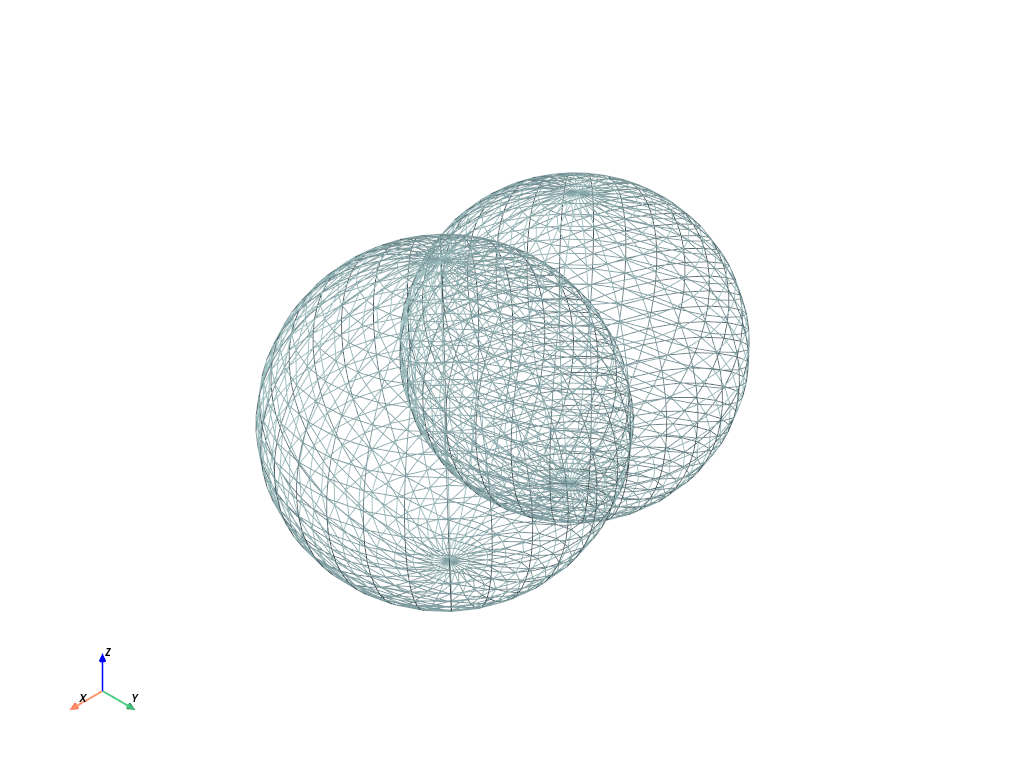
>>> import pyvista as pv
>>> sphere_a = pv.Sphere()
>>> sphere_b = pv.Sphere(center=(0.5, 0, 0))
>>> merged = sphere_a.merge(sphere_b)
>>> merged.plot(style='wireframe', color='lightblue')